How to Play Minesweeper on Google (Flags & No-Mouse Controls)
Want to jump straight into a round? Click any cell on the 9×9 board right below to start immediately (with a 1-click 🚩 Flag toggle built in), or read on for every Google Minesweeper control, flagging shortcut, and trackpad trick.
Last updated: 2026-10-30
Play 9×9 Beginner Right Here · Click any cell to start (safe 1st click)
Full Screen / Hard Mode & Live Odds →Click to dig · Right-click, long-press, or toggle 🚩 Flag (no mouse needed) · Double-click numbers to chord
Google Minesweeper is the free classic logic puzzle built directly into Google Search: type “minesweeper” into the search bar and click Play to open an instant browser board across three difficulty levels (Easy, Medium, and Hard) on desktop, laptop, or mobile with no download required.
How to Open and Play Minesweeper on Google
- Go to Google Search and type “minesweeper” or “google minesweeper”.
- Click the blue Play button inside the interactive Doodle card at the top of the results.
- Select Easy (10×8, 10 mines), Medium (18×14, 40 mines), or Hard (24×20, 99 mines) and click any green tile — your first click is guaranteed mine-free.
- Use the numbers (each counts mines in the 8 adjacent squares) to flag every mine and uncover all safe tiles.
How to Place a Flag in Google Minesweeper
Flagging marks squares you know contain mines so you never click them by mistake — and lets you clear surrounding safe squares much faster. In Google Minesweeper, right-clicking an unopened square on desktop (or long-pressing on a touchscreen) drops a red flag 🚩; repeating the gesture removes it.
How to Flag in Minesweeper Without a Mouse (Laptop Trackpad & Chromebook)
Many players try pressing the Spacebar or F key to flag mines, only to watch the Google Search page scroll down. Google’s built-in Minesweeper widget does not support keyboard shortcuts for flagging. Instead, use your device’s exact right-click / touch equivalent:
| Device | Dig / Open Square | Place / Remove Flag 🚩 |
|---|---|---|
| Desktop Mouse (PC / Mac) | Left-click | Right-click an unopened square |
| MacBook Trackpad | 1-finger tap / click | Two-finger tap or hold Control + Click |
| Windows Laptop Touchpad | 1-finger tap / click | Two-finger tap or press bottom-right corner |
| Chromebook Trackpad | 1-finger tap / click | Two-finger tap or hold Alt + Click |
| Phone & Tablet (iOS / Android) | Single tap | Long-press square or tap bottom 🚩 / ⛏️ toggle |
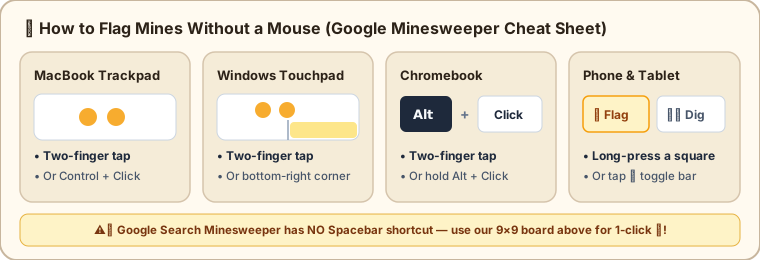
- Trackpad speed tip: Enable Tap to click in your system settings so a light two-finger tap places a flag instantly without depressing the physical pad.
- Single-button mouse or cramped laptop? Switch to Meathill Minesweeper (or use the mini-board at the top of this page): once flags around a number match that number, double-clicking the number chords all remaining safe neighbors open — zero right-click chord gymnastics required.
Core Rules & Where Google Minesweeper Falls Short
Google’s version follows classic Minesweeper rules and number patterns, making it a great quick break. However, players trying to beat Hard consistently run into three roadblocks:
- No probability hints: Endgame 50/50s stay pure guesswork, so you never learn whether another cell actually had a 15% vs. 65% mine risk.
- No post-game replay: One misclick ends the run with no way to rewind to the turning point.
- Non-standard grid sizes & volatile stats: Google uses 10×8 / 18×14 / 24×20 instead of official 9×9 / 16×16 / 16×30 boards, and clearing browser data wipes your best times.
Want to turn guessing into calculating? Open Meathill Minesweeper to play with Learn Mode (live mine-probability heatmap + 0–10 move efficiency scoring + full click-by-click replay), or test tricky board states in our Minesweeper Probability Calculator.